Most CrowdSec guides are fine right up until you have more than one machine.
Before CrowdSec, I was doing what a lot of us do. I ran Fail2Ban.
And to be fair to Fail2Ban, it did its job well. It is simple, dependable, and it has saved plenty of boxes from the usual background nonsense of the internet. If all you need is “watch a log, match a pattern, ban an IP on this host,” Fail2Ban still makes a lot of sense.
I also spent years with OSSEC in the mix as a host-based intrusion detection layer. That taught me a lot, and for a long time it was a useful way to watch what was happening on the box itself.
The problem was not that Fail2Ban was bad. The problem was that my environment stopped being one box with one job.
Once I had a real fleet, a public VPS, internal services, WireGuard-connected nodes, Cloudflare in front of some things, and a growing pile of logs from different systems, I wanted something that felt less like a local patch and more like an actual security layer. That is where CrowdSec started to make more sense. Shared decisions, better visibility, broader detection logic, and a cleaner path to fleet-wide enforcement.
These days the split is pretty clean. CrowdSec handles the app and service side of the equation across the fleet, and pfSense handles the broader network edge everywhere else. That division has worked a lot better for me than trying to make one tool pretend it should own every layer.
Single-node installs are easy. You run the Security Engine locally, keep the Local API on the same box, bolt on a bouncer, and call it a day. That works until your lab grows teeth. Then every node becomes its own little island. An IP can get banned on one machine and still stroll into the next one like nothing happened.
That was the part I wanted to fix.
This is the CrowdSec layout I run now: one dedicated LAPI hub, agents spread across the fleet, firewall bouncers on the nodes that need local enforcement, a Cloudflare bouncer on my public VPS, Telegram alerts for the noisy stuff, and Ansible to keep the whole thing from turning into a pile of one-off edits I regret later.
If you are just getting started, read the official CrowdSec docs first:
Then come back here when you want the version that assumes you have more than one box and would like them to behave like they know each other.
Architecture Overview
                        +----------------------------------+
                        | GateKeeper                       |
                        | 192.168.70.84                    |
                        | CrowdSec LAPI hub in Docker      |
                        | LAPI exposed internally on 8888  |
                        +----------------+-----------------+
                                         |
                 +-----------------------+-----------------------+
                 |                       |                       |
        +--------v---------+   +---------v--------+   +----------v---------+
        | moonlab          |   | stargate         |   | nexus-node         |
        | CrowdSec agent   |   | CrowdSec agent   |   | CrowdSec agent     |
        | firewall bouncer |   | firewall bouncer |   | firewall bouncer   |
        +------------------+   +------------------+   | Cloudflare bouncer |
                                                       +--------------------+
                 |                       |                       |
                 +-----------------------+-----------------------+
                                         |
                              +----------v-----------+
                              | 8+ more agents       |
                              | mixed lab nodes      |
                              +----------------------+
Here is the clean mental model:
- GateKeeper is the decision hub. It runs CrowdSec, stores the machine and bouncer registrations, receives events from the fleet, and issues decisions.
- Agents do detection. They read logs, parse events, and report what they see to GateKeeper.
- Bouncers do enforcement. On most of my nodes that means the firewall bouncer. On the public VPS it also means the Cloudflare bouncer.
- WireGuard keeps the trusted paths trusted. The public VPS talks back to the internal CrowdSec hub over WireGuard instead of anything internet-facing.
That last part matters. My LAPI is not a public service. It is an internal service, reachable over the LAN and over trusted WireGuard-connected paths.
Why I Switched to Hub and Spoke
I wanted three things:
- One decision plane.
- Consistent bans across the fleet.
- A way to onboard new nodes without re-inventing the setup every time.
That is the real advantage of this model. It is not just “more secure.” It is more operationally sane.
If herald sees junk, I want nexus-node to learn from it. If the public VPS gets hammered, I want the same hostile IP to be unwelcome elsewhere too. If OpenSSH changes log behavior again, I want one known parser fix that rolls out everywhere instead of a weekend of wondering why brute force detection went silent on half the fleet.
That is really the whole pitch. Less guesswork, less drift, fewer weird little exceptions that only make sense because you were tired when you set them up.
Core Roles: LAPI Hub, Agents, and Bouncers
CrowdSec’s official docs separate the moving parts pretty clearly, and that maps well to real life:
- Security Engine reads logs and detects bad behavior.
- LAPI is the shared brain and decision point.
- Bouncers consume decisions and block things.
In my setup:
- GateKeeper runs the shared LAPI.
- Each node runs an agent.
- Each node that should enforce bans locally runs
crowdsec-firewall-bouncer. nexus-nodealso runs the Cloudflare bouncer because it is public-facing and benefits from blocking at the edge.
That split has held up much better than trying to make every box self-contained.
GateKeeper, the Central CrowdSec Hub
GateKeeper is a dedicated Proxmox VM. CrowdSec runs there in Docker. The important part is not that it is Docker. The important part is that it is stable, internal, and reachable by the rest of the fleet.
I expose the LAPI internally on port 8888. That lines up with how I actually onboard nodes and bouncers in the rest of my CrowdSec repo, and it keeps this guide consistent with the setup I am really running.
Example Compose skeleton:
services:
  crowdsec:
    image: crowdsecurity/crowdsec:latest
    container_name: crowdsec
    restart: unless-stopped
    environment:
      COLLECTIONS: >
        crowdsecurity/linux
        crowdsecurity/sshd
        crowdsecurity/whitelist-good-actors
        crowdsecurity/base-http-scenarios
    volumes:
      - ./config:/etc/crowdsec
      - ./data:/var/lib/crowdsec/data
      - /var/log:/var/log:ro
    ports:
      - "8888:8080"
      - "6060:6060"
A few notes:
- The container still listens on
8080internally. I publish it as8888on the host. 6060is there if you want to inspect metrics and internals.- Keep the host-side
8888bound to trusted networks only.
Before any node can join the fleet, I register it on GateKeeper:
docker exec crowdsec cscli machines add herald-agent --auto --force
docker exec crowdsec cscli machines add nexus-vps-agent --auto --force
Before any node can enforce decisions, I register its bouncer:
docker exec crowdsec cscli bouncers add herald-firewall-bouncer
docker exec crowdsec cscli bouncers add nexus-firewall-bouncer
docker exec crowdsec cscli bouncers add thelounge-bouncer
That is the control plane. Everything else hangs off of it.
Collections I Actually Run
This is the part I like seeing in other people’s CrowdSec posts because it tells you what they are really feeding the engine, not just what sounds nice in a diagram.
Current collection set on my hub:
docker exec crowdsec cscli collections list
crowdsecurity/base-http-scenarios
crowdsecurity/http-cve
crowdsecurity/linux
crowdsecurity/nginx
crowdsecurity/nginx-proxy-manager
crowdsecurity/pgsql
crowdsecurity/sshd
crowdsecurity/whitelist-good-actors
firix/authentik
That mix covers the stuff I actually care about in this environment:
- Linux host activity
- SSH abuse
- generic HTTP garbage
- Nginx and Nginx Proxy Manager logs
- PostgreSQL
- Authentik-specific detection
- baseline good-actor whitelisting from the community collection
If you want to install collections manually, it is straightforward:
docker exec crowdsec cscli collections install crowdsecurity/linux
docker exec crowdsec cscli collections install crowdsecurity/sshd
docker exec crowdsec cscli collections install crowdsecurity/nginx
docker exec crowdsec cscli collections install crowdsecurity/nginx-proxy-manager
docker exec crowdsec cscli collections install crowdsecurity/http-cve
docker exec crowdsec cscli collections install crowdsecurity/base-http-scenarios
docker exec crowdsec cscli collections install crowdsecurity/pgsql
docker exec crowdsec cscli collections install crowdsecurity/whitelist-good-actors
docker exec crowdsec cscli collections install firix/authentik
Because I am running CrowdSec in Docker, all of my cscli collection management happens through docker exec crowdsec ... on the hub. Same idea on agent nodes if you are running the Security Engine in Docker Compose there too. If your agent container is called crowdsec-agent, then the command pattern is the same, just pointed at the right container:
docker exec crowdsec-agent cscli collections list
docker exec crowdsec-agent cscli collections install crowdsecurity/sshd
You do not need to install everything in the hub just because it exists. Install what matches your logs. Otherwise you are just collecting YAML like it is a hobby.
Manual Onboarding for a New Node
This is the part I care about most because it is where most guides go from “helpful” to “good luck.”
When I add a new host, I think in two roles:
- Watcher: the CrowdSec agent, usually in Docker for my Linux nodes
- Enforcer: the native firewall bouncer
For a new Linux node, the agent Compose file looks more like this in my world:
services:
  crowdsec-agent:
    image: crowdsecurity/crowdsec:latest
    container_name: crowdsec-agent
    restart: unless-stopped
    ports:
      - "6060:6060"
    environment:
      - METRICS_LISTEN_ADDR=0.0.0.0:6060
      - CROWDSEC_LAPI_URL=http://<lapi-lan-ip>:8888
      - DISABLE_LOCAL_API=true
      - AGENT_USERNAME=<node-agent-name>
      - AGENT_PASSWORD=<generated-machine-password>
      - COLLECTIONS=crowdsecurity/linux crowdsecurity/sshd crowdsecurity/whitelist-good-actors crowdsecurity/base-http-scenarios
    volumes:
      - /var/log:/var/log:ro
      - /var/run/docker.sock:/var/run/docker.sock:ro
      - /var/lib/docker/containers:/var/lib/docker/containers:ro
      - /home/<user>/crowdsec/data:/var/lib/crowdsec/data
      - /home/<user>/crowdsec/config:/etc/crowdsec
      - /srv/<reverse-proxy-log-path>:/npm-logs:ro
      - /home/<user>/crowdsec/config/acquis.d:/etc/crowdsec/acquis.d:ro
Important details:
DISABLE_LOCAL_API=truekeeps the node in agent mode. It reports upward and does not pretend to be its own little island.- The username and password come from the machine registration created on GateKeeper.
METRICS_LISTEN_ADDRgives me a predictable place to scrape agent metrics if I want them.- I mount both normal logs and Docker logs because most of my nodes have a mix of services.
- The reverse proxy log mount is there because some of the most useful detections start with whatever is smacking into Nginx Proxy Manager all day.
- The
acquis.dmount matters once you want the agent to read more than the defaults and stop pretending every node logs the same way.
If your host is simpler than that, great, use fewer mounts. If it is doing real work, the more complete version tends to age better.
Then I install the firewall bouncer on the host:
curl -s https://install.crowdsec.net | sudo sh
sudo apt install crowdsec-firewall-bouncer-iptables
/etc/crowdsec/bouncers/crowdsec-firewall-bouncer.yaml:
api_url: http://192.168.70.84:8888/
api_key: <bouncer-api-key>
That is enough to get a node participating.
Verification from GateKeeper:
docker exec crowdsec cscli machines list
docker exec crowdsec cscli bouncers list
If both lists look healthy, the node is in business.
If you only have one or two machines, doing that by hand is fine. Once you have an actual fleet, the agent deployment is exactly the kind of thing that should be automated with Ansible. That is where it starts paying for itself fast: one role, one variable model, one parser rollout, one whitelist update, and no mystery snowflake node you forgot to fix three weeks ago.
Public VPS Nodes Over WireGuard
This is where the hub-and-spoke model really pays off.
My public Debian and Ubuntu VPS nodes do not talk to the CrowdSec hub over the public internet. They reach it over WireGuard and use the same LAPI target as the internal nodes, just through the private tunnel.
That means the same patterns still apply:
CROWDSEC_LAPI_URL=http://10.6.0.1:8888
and:
api_url: http://10.6.0.1:8888/
If the box is remote, the only thing that changes is the trusted path to the hub. The behavior does not.
That consistency is worth a lot.
The OpenSSH 9.8 sshd-session Problem
This is the exact kind of thing that quietly ruins your day.
OpenSSH 9.8 changed the per-session process name from sshd to sshd-session. CrowdSec’s normal SSH parser is expecting sshd. So once that rename lands, brute force detection can quietly stop working unless you account for it.
No fireworks. No dramatic crash. Just less detection, which is somehow more annoying.
My fix is a compatibility parser at the s00-raw stage:
# /etc/crowdsec/parsers/s00-raw/ak/sshd-session-rename.yaml
filter: "evt.Parsed.program == 'sshd-session'"
name: ak/sshd-session-rename
description: "Rewrite sshd-session to sshd for OpenSSH 9.8+ compatibility"
nodes:
  - transform:
      - "evt.Parsed.program = 'sshd'"
onsuccess: next_stage
That lets the standard SSH parser continue doing its job without me having to fork the whole collection.
I also make sure rsyslog forwards sshd-session logs explicitly where needed:
auth,authpriv.*  @@192.168.70.84:514
if $programname == 'sshd-session' then @@192.168.70.84:514
That matters on hosts where the session rename would otherwise make your forwarded logs look incomplete.
If you want to sanity-check a parser before rolling it out, cscli explain is your friend:
docker exec crowdsec cscli explain --type syslog --file /var/log/auth.log
Use that before production. It is a much cheaper learning experience.
Whitelists and Not Locking Yourself Out Like an Amateur
I learned this one the fun way.
At one point I was using logger to simulate SSH brute force lines while connected over SSH from home. CrowdSec did exactly what I asked it to do, which turned out to be a deeply unhelpful thing to ask. I got my home IP banned, lost SSH, and lost WireGuard at the same time.
So now I keep a few targeted whitelists in place instead of one vague “trust me bro” parser.
1. Trusted lab networks
This is the broad internal trust layer for known VLANs and the WireGuard mesh:
# /etc/crowdsec/parsers/s02-enrich/ak/trusted-ips-whitelist.yaml
name: ak/trusted-ips
description: "Whitelist internal trusted VLANs and WireGuard mesh"
whitelist:
  reason: "Internal homelab networks (MAIN, KIDS, Lab, WireGuard)"
  cidr:
    - "10.6.0.0/24"
    - "192.168.1.0/24"
    - "192.168.10.0/24"
    - "192.168.20.0/24"
    - "192.168.70.0/24"
2. Local and service-specific chatter
This one keeps internal Authentik traffic, localhost, and my DDNS-resolved home IP from getting treated like strangers:
# /etc/crowdsec/parsers/s02-enrich/user/local-whitelist.yaml
name: user/local-whitelist
description: "Whitelist internal Authentik and LAN traffic"
whitelist:
  reason: "Internal service chatter"
  ip:
    - "192.168.70.6"
  cidr:
    - "192.168.70.0/24"
    - "127.0.0.1/32"
    - "::1/128"
  expression:
    - "evt.Meta.source_ip == LookupHost('pfsense.example.cloud')[0]"
3. Cloudflare IPs
This one is there because if you are proxying public services through Cloudflare, you do not want to waste time banning Cloudflare itself and then wondering why your logs got weird:
# /etc/crowdsec/parsers/s02-enrich/crowdsecurity/cloudflare-whitelist.yaml
name: crowdsecurity/cloudflare-whitelist
description: Whitelist Cloudflare IPs
whitelist:
  reason: "Cloudflare IP"
  cidr:
    - "103.21.244.0/22"
    - "103.22.200.0/22"
    - "103.31.4.0/22"
    - "104.16.0.0/13"
    - "104.24.0.0/14"
    - "108.162.192.0/18"
    - "131.0.72.0/22"
    - "141.101.64.0/18"
    - "162.158.0.0/15"
    - "172.64.0.0/13"
    - "173.245.48.0/20"
    - "188.114.96.0/20"
    - "190.93.240.0/20"
    - "197.234.240.0/22"
    - "198.41.128.0/17"
That Cloudflare list is practical, but it is also a maintenance item. Cloudflare can change IP ranges over time, so treat it like living config, not stone tablets.
For residential IPs that move around, I do not hardcode them. I resolve my DDNS record at play time in Ansible:
crowdsec_trusted_home_ip: ""
That keeps the allowlist current without me pretending my ISP respects my preferences.
Between the built-in crowdsecurity/whitelist-good-actors collection and these local parsers, the false-positive rate stays a lot more civilized.
Cloudflare Bouncer on the Public Edge
nexus-node is my public-facing VPS, so I also run the Cloudflare bouncer there.
That gives me two layers:
- local firewall enforcement on the VPS itself
- Cloudflare-side blocking before requests even reach the host
Install flow:
wget https://github.com/crowdsecurity/cs-cloudflare-bouncer/releases/latest/download/cs-cloudflare-bouncer.tgz
tar xvzf cs-cloudflare-bouncer.tgz
cd cs-cloudflare-bouncer
sudo ./install.sh
Register the bouncer on GateKeeper:
docker exec crowdsec cscli bouncers add thelounge-bouncer
Example config:
crowdsec_lapi_url: http://10.6.0.1:8888
crowdsec_lapi_key: <bouncer-key>
cloudflare_config:
  accounts:
    - id: "<CF_ACCOUNT_ID>"
      token: "<CF_API_TOKEN>"
      zones:
        - zone_id: "<ZONE_ID>"
          actions:
            - block
For the API token, keep permissions tight. It does not need to be a god token to block IPs.
Real-Time Telegram Alerts
Real-time Telegram alerts come from GateKeeper’s notification pipeline, not from some cloud quota lottery.
That part is worth calling out because it catches people off guard. The Telegram notifications are local. If CrowdSec sees a ban-worthy event and your profile is wired correctly, you get the message.
Example notification config:
type: http
name: telegram_default
log_level: info
format: |
  🚨 *CrowdSec Alert*
  *Scenario:*
  *IP:*
  *Country:*
  *ASN:*
  *Action:*

url: https://api.telegram.org/bot<YOUR_TOKEN>/sendMessage
method: POST
headers:
  Content-Type: application/json
body: |
  {
    "chat_id": "<YOUR_CHAT_ID>",
    "text": "",
    "parse_mode": "Markdown"
  }
Then wire it into profiles.yaml:
name: default_ip_remediation
filters:
  - Alert.Remediation == true && Alert.GetScope() == "Ip"
decisions:
  - type: ban
    duration: 24h
notifications:
  - telegram_default
on_success: break
That gets you instant signal when the fleet actually starts doing work.
In my case that file lives under:
~/crowdsec/config/notifications/telegram.yaml
and CrowdSec uses it for the real-time “something just got banned” path.
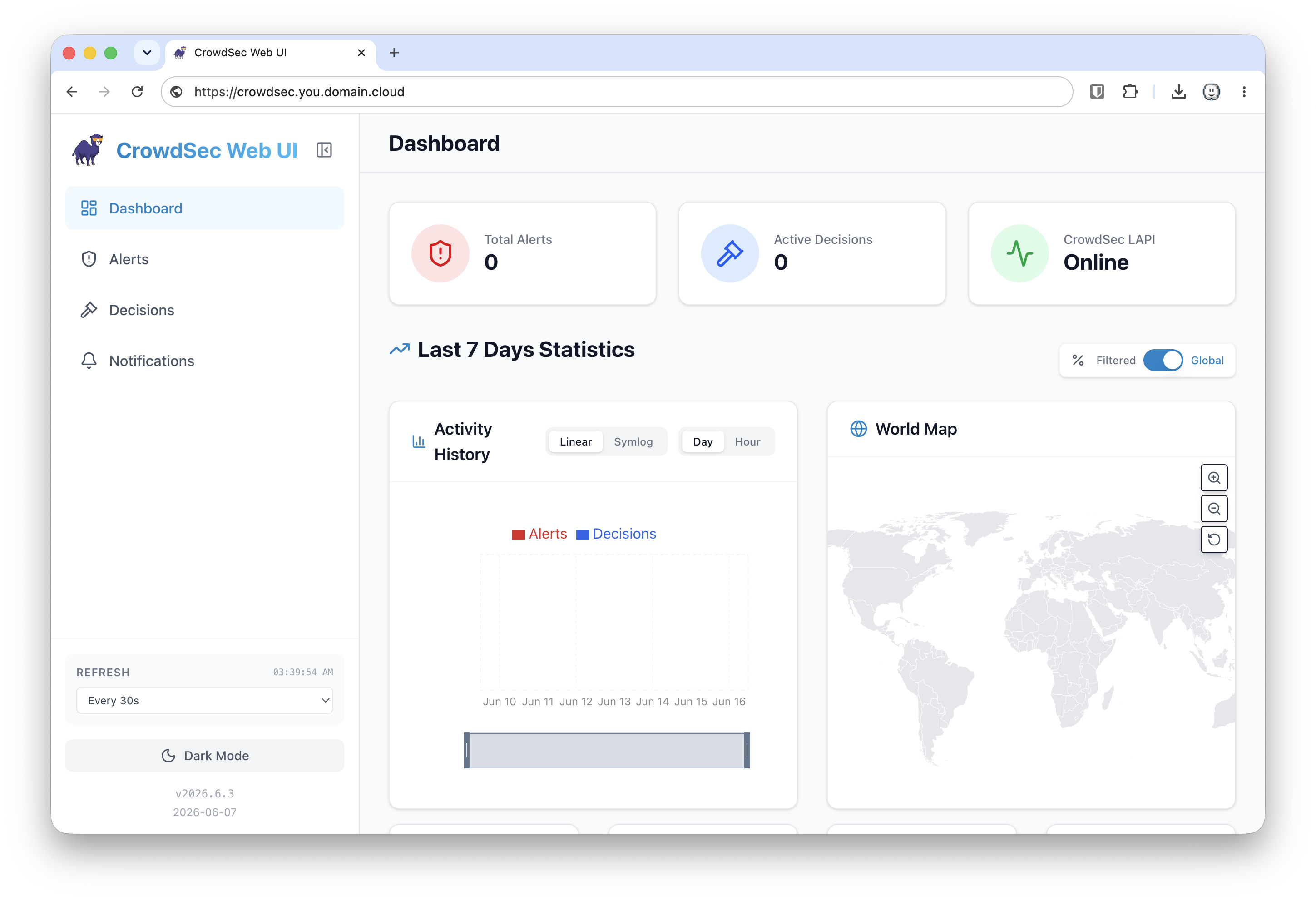
CrowdSec Local Web UI
For day-to-day visibility, I also run TheDuffman85/crowdsec-web-ui.
This is not the part that makes decisions. It is the part that makes it easier to see what CrowdSec is doing without living in cscli all day.
That matters more than you might think, especially in a quieter environment like mine. Most of my services are internal-only, and only a few are meaningfully exposed. So the noise floor is lower than what you would see on a fully public fleet. That is exactly why I like having the local web UI. When the signal is quieter, a clean dashboard helps you notice real patterns faster.
The local UI gives me:
- a quick dashboard view
- alert browsing
- decision browsing
- LAPI status at a glance
- a cleaner visual way to check whether the system is awake or just being blessedly boring for once
Example dashboard:
My Compose layout is pretty simple, but I would strongly recommend keeping anything sensitive abstracted into env files or secrets instead of hardcoding it in plain text forever.
Sanitized example:
services:
  crowdsec:
    image: crowdsecurity/crowdsec:latest
    container_name: crowdsec
    restart: unless-stopped
    environment:
      - CUSTOM_HOSTNAME=gatekeeper-master
      - COLLECTIONS=crowdsecurity/linux crowdsecurity/sshd crowdsecurity/nginx-proxy-manager crowdsecurity/whitelist-good-actors crowdsecurity/base-http-scenarios firix/authentik crowdsecurity/pgsql
      - PARSERS=crowdsecurity/docker-logs crowdsecurity/cri-logs crowdsecurity/sshd-logs
      - LAPI_LISTEN_ADDR=0.0.0.0
      - LAPI_LISTEN_PORT=8888
      - METRICS_LISTEN_ADDR=0.0.0.0
      - CROWDSEC_LAPI_URL=http://127.0.0.1:8888
      - TRUSTED_IPS=127.0.0.1,<wireguard-cidr>,<lan-cidrs>,<trusted-public-ip>
    volumes:
      - /home/ak/crowdsec/config:/etc/crowdsec
      - /home/ak/crowdsec/data:/var/lib/crowdsec/data
      - /var/log/auth.log:/var/log/auth.log:ro
      - /var/log/syslog:/var/log/syslog:ro
      - /var/log/kern.log:/var/log/kern.log:ro
      - /var/log/crowdsec-fleet.log:/var/log/crowdsec-fleet.log:ro
    ports:
      - "8888:8888"
      - "6060:6060"
    networks:
      - crowdsec_net

  crowdsec-ui:
    image: ghcr.io/theduffman85/crowdsec-web-ui:latest
    container_name: crowdsec-ui
    restart: unless-stopped
    environment:
      - CROWDSEC_URL=http://crowdsec:8888
      - CROWDSEC_USER=<ui-machine-user>
      - CROWDSEC_PASSWORD=<ui-machine-password>
      - TRUSTED_IPS=<trusted-ui-subnets>
    ports:
      - "8181:3000"
    networks:
      - crowdsec_net
    depends_on:
      - crowdsec

networks:
  crowdsec_net:
    driver: bridge
A few notes:
- I keep the UI local and trusted. It is not something I would throw onto the public internet raw.
- Put it behind your reverse proxy and your existing auth layer if you want browser access beyond the box itself.
- The UI is great for visibility, but
cscliis still the source of truth when you want exact answers.
That is the balance I like. The UI gives me fast eyes. The CLI gives me certainty.
CrowdSec Daily Digest, the Morning Summary
The digest is separate from the real-time alerts.
That distinction matters:
- real-time Telegram notifications tell you when a decision fires
- daily digest tells you what the overall day looked like
My digest runs as a small shell script on GateKeeper and posts into Telegram through GateKeeper222_bot.
It pulls:
- total active local decisions
- decisions from CAPI
- decisions from blocklists
- agents online
- bouncers active
- Herald and Nexus health
- alerts seen in the last 24 hours
- basic scenario breakdown for SSH brute force, HTTP scan, HTTP brute force, and Tor
This is the cron I use:
15 01 * * * /usr/local/bin/crowdsec-daily-digest.sh >> /var/log/crowdsec-digest.log 2>&1
That gives me one digest a night at 1:15 AM, and it leaves a log behind in case I want to verify the run or troubleshoot a broken post.
The script is intentionally simple:
#!/bin/bash
# CrowdSec Daily Digest - posts to Telegram via GateKeeper222_bot

BOT_TOKEN="${BOT_TOKEN:-REPLACE_ME}"
CHAT_ID="${CHAT_ID:-REPLACE_ME}"
DATE=$(date +"%Y-%m-%d")

LOCAL_DECISIONS=$(docker exec crowdsec cscli decisions list -o human 2>/dev/null | tail -n +3 | grep -v "^$" | wc -l)
CAPI_COUNT=$(docker exec crowdsec cscli decisions list --origin CAPI -o raw 2>/dev/null | wc -l)
LISTS_COUNT=$(docker exec crowdsec cscli decisions list --origin lists -o raw 2>/dev/null | wc -l)
MACHINES=$(docker exec crowdsec cscli machines list 2>/dev/null | grep -c "✔️")
BOUNCERS=$(docker exec crowdsec cscli bouncers list 2>/dev/null | grep -c "✔️")
ALERTS_24H=$(docker exec crowdsec cscli alerts list --since 24h -o human 2>/dev/null | tail -n +3 | grep -v "^$" | wc -l)
And the status checks for the two nodes I care about most in the digest look like this:
HERALD_STATUS=$(docker exec crowdsec cscli machines list 2>/dev/null | grep "herald-agent" | grep -c "✔️" | awk '{if ($1=="1") print "✔️ Online"; else print "⚠️ Offline"}')
NEXUS_STATUS=$(docker exec crowdsec cscli machines list 2>/dev/null | grep "nexus-vps-agent" | grep -c "✔️" | awk '{if ($1=="1") print "✔️ Online"; else print "⚠️ Offline"}')
Then it builds the message and posts it with curl:
MESSAGE="📊 *KDN Lab CrowdSec Daily Digest*
📅 $DATE

🛡 *Fleet Status*
- Agents online: $MACHINES
- Bouncers active: $BOUNCERS
- Herald: $HERALD_STATUS
- Nexus: $NEXUS_STATUS

🚨 *Alerts (Last 24h)*
- Local detections: $ALERTS_24H

🔒 *Active Decisions*
- CAPI community blocklist: $CAPI_COUNT IPs
- Blocklists (tor/firehol/otx): $LISTS_COUNT IPs
- Local decisions: $LOCAL_DECISIONS

📈 *Decision Breakdown*
- SSH brute force: $SSH_BF
- HTTP scan: $HTTP_SCAN
- HTTP brute force: $HTTP_BF
- Tor exit nodes: $TOR"

curl -s -X POST "https://api.telegram.org/bot${BOT_TOKEN}/sendMessage" \
  -H "Content-Type: application/json" \
  -d "{
    \"chat_id\": \"${CHAT_ID}\",
    \"text\": \"${MESSAGE}\",
    \"parse_mode\": \"Markdown\"
  }" > /dev/null
The one thing I would strongly recommend is keeping the bot token and chat ID out of the script itself. Environment variables, a root-owned env file, or a secrets manager are all better choices than hardcoding it and hoping future-you never pastes the file somewhere public.
This is one of those tiny additions that turned out to be more useful than expected. You stop wondering whether the fleet is healthy because you get a daily roll-up without having to go poking around half asleep.
Example output:
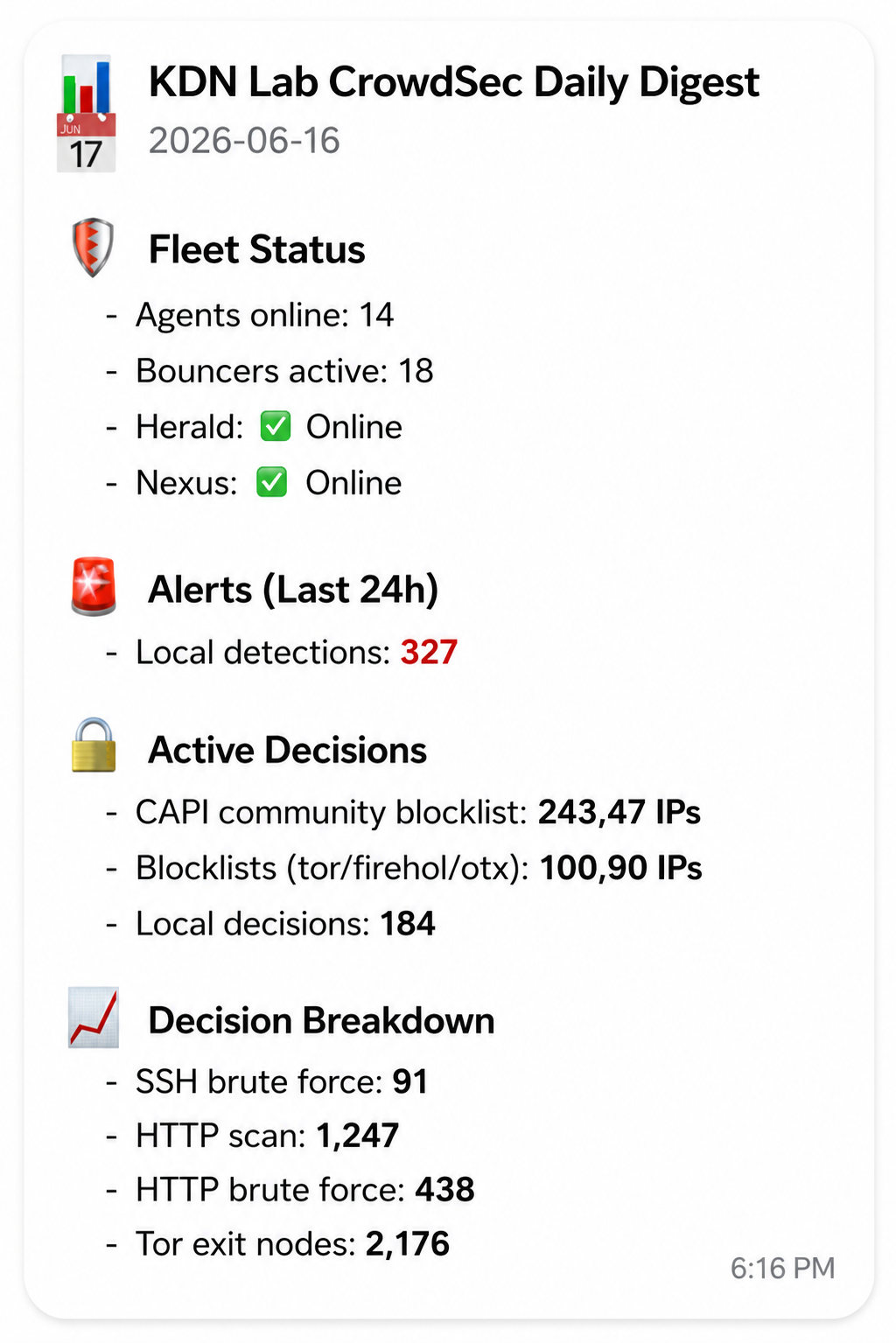
That digest has been more useful than I expected. Real-time alerts tell me something happened. The daily digest tells me what kind of day the fleet had without making me open three tabs and start muttering at cscli.
Ansible, the Part That Keeps It Maintainable
Once the manual flow worked, I moved the repetitive pieces into Ansible.
That includes:
- agent config deployment
- custom parser deployment
- whitelist deployment
- firewall bouncer install and config
- per-host variables for usernames and paths
- DDNS lookup for trusted home IPs
This is the point where the setup stopped feeling like a project and started feeling like infrastructure.
You can absolutely hand-build CrowdSec across a fleet. You can also hand-edit nftables rules at 2 AM and tell yourself that is character building. I am not saying you cannot do it. I am saying there are better hobbies.
In my case the split is simple:
- the CrowdSec role handles parser files, collection choices, config paths, and agent-side wiring
- the bouncer role handles the host-side enforcement layer
- group vars keep the shared defaults sane
- host vars handle the few places where a node insists on being special
That last part always happens. There is always one box that wants a different user, a different path, or a slightly different shape of logging because it enjoys attention.
The config path varies by host because not every node logs in with the same user:
crowdsec_config_dir: "/home//crowdsec/config"
That sounds minor until the first time you forget a Pi is using pi, another box is using docker, and the rest are using ak.
I also resolve the home IP dynamically:
crowdsec_trusted_home_ip: ""
That means the allowlist updates when the playbook runs, which is much better than discovering your IP changed because CrowdSec very thoughtfully blocked you.
The same automation also makes parser rollout much less risky. If I need to ship the sshd-session compatibility fix, or update a whitelist, or add a new collection for a service that just went live, I do it once and let the fleet catch up.
Fleet deployment stays simple:
ansible-playbook playbooks/crowdsec.yml
That is the part I would not skip. Manual setup teaches you what the pieces do. Ansible is what keeps the setup from slowly turning into folklore.
If you want an even deeper breakdown of the role structure, inventory layout, and exact variable model, that deserves its own dedicated post. In this guide, I want the automation to be clear without letting it swallow the actual CrowdSec architecture.
Useful cscli Commands
From GateKeeper, these are the ones I use the most:
# Fleet health
docker exec crowdsec cscli machines list
docker exec crowdsec cscli bouncers list

# Decisions
docker exec crowdsec cscli decisions list
docker exec crowdsec cscli decisions add --ip 1.2.3.4 --duration 24h --reason "manual"
docker exec crowdsec cscli decisions delete --ip 1.2.3.4

# Alerts
docker exec crowdsec cscli alerts list
docker exec crowdsec cscli alerts inspect <ID>

# Parsers and scenarios
docker exec crowdsec cscli parsers list
docker exec crowdsec cscli scenarios list
These are the commands I reach for when I want to answer one of three questions:
- is the fleet alive
- who got banned
- why did CrowdSec think that was a good idea
What This Looks Like in Practice
On a normal day, most of the junk is still familiar:
- SSH brute force
- HTTP probing
- scanners looking for old garbage
- community blocklist hits from CAPI
What changed after moving to this model was not the kind of noise. It was the consistency of the response.
Once one node learns, the whole fleet benefits. Once a parser fix lands, the whole fleet gets it. Once I onboard a new node, it stops being special almost immediately.
That is the part I wanted.
Quick Verification Checklist
If you want a fast sanity check after onboarding a node or rolling out parser changes, this is the short list I would run before calling the job done.
Machine registered
From GateKeeper:
docker exec crowdsec cscli machines list
docker exec crowdsec cscli machines list | grep 'herald-agent'
What you want to see:
- the agent listed in the machine table
- a healthy check mark
- recent heartbeat activity
In my case that looks like a normal registered agent with a private address, current version, and a fresh heartbeat. Same idea on your side even if the hostname and addressing differ.
Bouncer registered
docker exec crowdsec cscli bouncers list
docker exec crowdsec cscli bouncers list | grep 'herald-firewall-bouncer'
What you want to see:
- the expected bouncer name
Validshowing healthy- a recent API pull
If the bouncer exists but never pulls, you do not really have enforcement yet. You just have paperwork.
LAPI reachable
From a LAN node:
curl -s http://<lapi-lan-ip>:8888/health
From a WireGuard-connected remote node:
curl -s http://<lapi-wireguard-ip>:8888/health
Healthy output should look like:
{"status":"up"}
That is the exact answer I want. No poetry, no banner, no guesswork.
Alerts visible
docker exec crowdsec cscli alerts list
What you want to see:
- recent scenarios
- real source IPs
- evidence that detections are flowing into the hub
If the fleet is talking but alerts are empty forever, either your parsers are not matching, your log inputs are thin, or you got very lucky all at once.
Test decision enforced
Add a short-lived manual decision from GateKeeper:
docker exec crowdsec cscli decisions add --ip 1.2.3.4 --duration 10m --reason "manual test"
docker exec crowdsec cscli decisions list | grep '1.2.3.4'
Then remove it when you are done:
docker exec crowdsec cscli decisions delete --ip 1.2.3.4
If you want to confirm the firewall bouncer actually pulled it on a node, check the local ruleset with whatever firewall backend that host is using.
Telegram alert received
For the real-time path, the easiest test is still making CrowdSec do a short manual ban and confirming the Telegram notification lands.
If you want to test the bot path by itself, post directly:
curl -s -X POST "https://api.telegram.org/bot${BOT_TOKEN}/sendMessage" \
  -H "Content-Type: application/json" \
  -d '{
    "chat_id": "'"${CHAT_ID}"'",
    "text": "CrowdSec Telegram test from GateKeeper"
  }'
That only proves Telegram works. It does not prove your CrowdSec notification pipeline works. Useful distinction.
If all six checks pass, the setup is usually in a good place:
- machines registered
- bouncers pulling
- LAPI healthy
- alerts flowing
- decisions replicating
- Telegram telling you about it
That is enough to sleep like a person who will probably still check logs in the morning anyway.
Troubleshooting Notes
If you build something like this and it is not behaving, these are the first places I would look:
Agent registered but not reporting
- confirm the machine exists in
cscli machines list - confirm the LAPI URL points to the right host and port
- confirm the node can actually reach GateKeeper over LAN or WireGuard
Bouncer installed but not enforcing
- confirm the API key was generated on GateKeeper
- confirm the bouncer config is pointing at the central LAPI, not localhost
- confirm you are not testing from a whitelisted IP
SSH brute force detections stopped after an OpenSSH upgrade
- check whether the host is now logging
sshd-session - confirm the compatibility parser is present
- run
cscli explainagainst a sample auth log
Telegram quiet when bans are happening
- confirm
profiles.yamlactually references the notification - test the Telegram bot and chat ID outside of CrowdSec first
- make sure you are not debugging a formatting issue while assuming it is a detection issue
That last one wastes a surprising amount of time.
Final Thoughts
If you only have one machine, a local CrowdSec install is fine.
If you have an actual fleet, even a small one, I think hub and spoke is the cleaner way to live. One LAPI, many agents, many bouncers, consistent decisions, and one place to inspect what is going on.
That is the whole point of this post. Not to make CrowdSec look impressive, but to make it operationally useful once your environment stops being hypothetical.
The docs are good. The official install path is good. What I wanted to add here was the part after that, where you have to make it survive real nodes, mixed users, WireGuard paths, OpenSSH changes, Cloudflare enforcement, and the occasional self-inflicted lockout.
That is the version I wish I had on day one.
If you want to adapt the broader pattern, the rest of my automation work lives under github.com/KDN-Cloud.
Comments
Questions, corrections, and follow-ups live in GitHub Discussions.