Linktree works. I’m not going to pretend it doesn’t. You sign up, you paste in some URLs, you get a page. For most people that’s good enough and I’d never argue otherwise.
What Linktree doesn’t give you is control. You’re on their platform, under their branding, subject to their pricing tier if you want anything beyond the basics, and your links are living in someone else’s database. For me personally, that’s just not how I build things. Everything I can reasonably own and self-host, I do. A links page is not a complex infrastructure problem. It’s a static HTML file. There’s no reason to outsource it.
So I built my own. It runs at links.aklein.pro, served free off GitHub Pages, custom domain, no subscription, no platform dependency.
Here’s how to do the same thing.
The Starting Point: johnggli/linktree
I didn’t build this from scratch. There’s an open source project by johnggli that gives you a clean, minimal Linktree-style page in plain HTML and CSS. No framework, no build step, no dependencies beyond Font Awesome for icons. It’s exactly the right level of complexity for this problem. Simple enough to understand completely, flexible enough to make it your own.
Fork it, customize it, deploy it. That’s the whole workflow.
My fork lives at github.com/KDN-Cloud/linktree.
What You’re Actually Editing
The repo has four files and one folder that matter:
index.html is the page itself. Your profile image, display name, optional quote, and all your links. Each link is an anchor tag with an icon, a label, and a URL. The structure is obvious once you open the file.
style.css controls the look. Background color, button styles, fonts, the animated starfield if you want to keep it. Strip it down or go deeper depending on how much you want the page to feel like yours.
CNAME is a single line containing your custom domain. This is what GitHub Pages reads to know which domain to serve the site from.
generator/ is a local tool folder. More on this below.
The Generator
Rather than hand-editing HTML every time you add a link or set up a new fork, I built a local generator tool at generator/index.html in the repo. Open it directly in any browser. No server, no install, no account.
The generator has two tabs:
Page Setup & SEO handles everything that goes in the <head> of your index.html, plus the profile block that goes in the <body>. Fill in your name, job title, bio, canonical URL, profile image, quote, organization details, and optional footer hashtag, and it generates three ready-to-paste outputs:
- Meta tags — full
<head>block covering primary SEO, Open Graph, and Twitter Card - JSON-LD schema — structured data with
ProfilePageandPersonschema includingsameAsURLs, location, andworksFor - Profile block — the
<header>HTML with your profile image, username, optional quote, and footer hashtag
Character counters on title and description fields keep you within search engine limits. Both meta outputs are independently copyable.
Link Generator handles individual link entries. Pick one of eight template styles, fill in the label, URL, icon class, and category, and it outputs the HTML snippet ready to paste into index.html. There’s a live preview that updates as you type, a history panel for saving links mid-session, and a Snippet vs. Full block toggle depending on whether you’re adding to an existing category or starting a new section.
Export — once you’ve filled in your details and built your links, hit the Export index.html button in the topbar. It assembles a complete, ready-to-deploy index.html and downloads it directly. The export pulls from the history panel, so use the Save button next to each generated link snippet to add it to history before exporting. Build a link, save it, repeat, then export when you’re done.
Eight template styles:
- AK / Terminal: dark mono card with icon, label, and optional
//suffix - Minimal: clean white card with arrow prefix, no icons
- Bold Dark: black button, uppercase, optional symbol prefix
- Glassmorphism: frosted glass card with translucent border and gradient backdrop
- Retro Terminal: green-on-black CRT style with blinking cursor
- Pill / Rounded: indigo-to-purple gradient pill button
- Editorial: serif italic, underline-only, typographic
- Corporate: white card with icon, label, and optional sublabel
Icon sources (both free, both loaded):
- Font Awesome free tier: fontawesome.com/search?m=free, e.g.
fa-brands fa-github,fa-solid fa-music - Bootstrap Icons, entirely free: icons.getbootstrap.com, e.g.
bi bi-github,bi bi-music-note
The generator ships with four UI themes (light, GitHub dark, navy, and purple), switchable from the topbar. It’s a local tool and isn’t deployed publicly.
Setting Up GitHub Pages
GitHub Pages will host this for free. The deployment model is dead simple: push to your branch, the site updates. No CI pipeline to configure, no build step, since this is plain HTML.
A few notes on setup that aren’t immediately obvious:
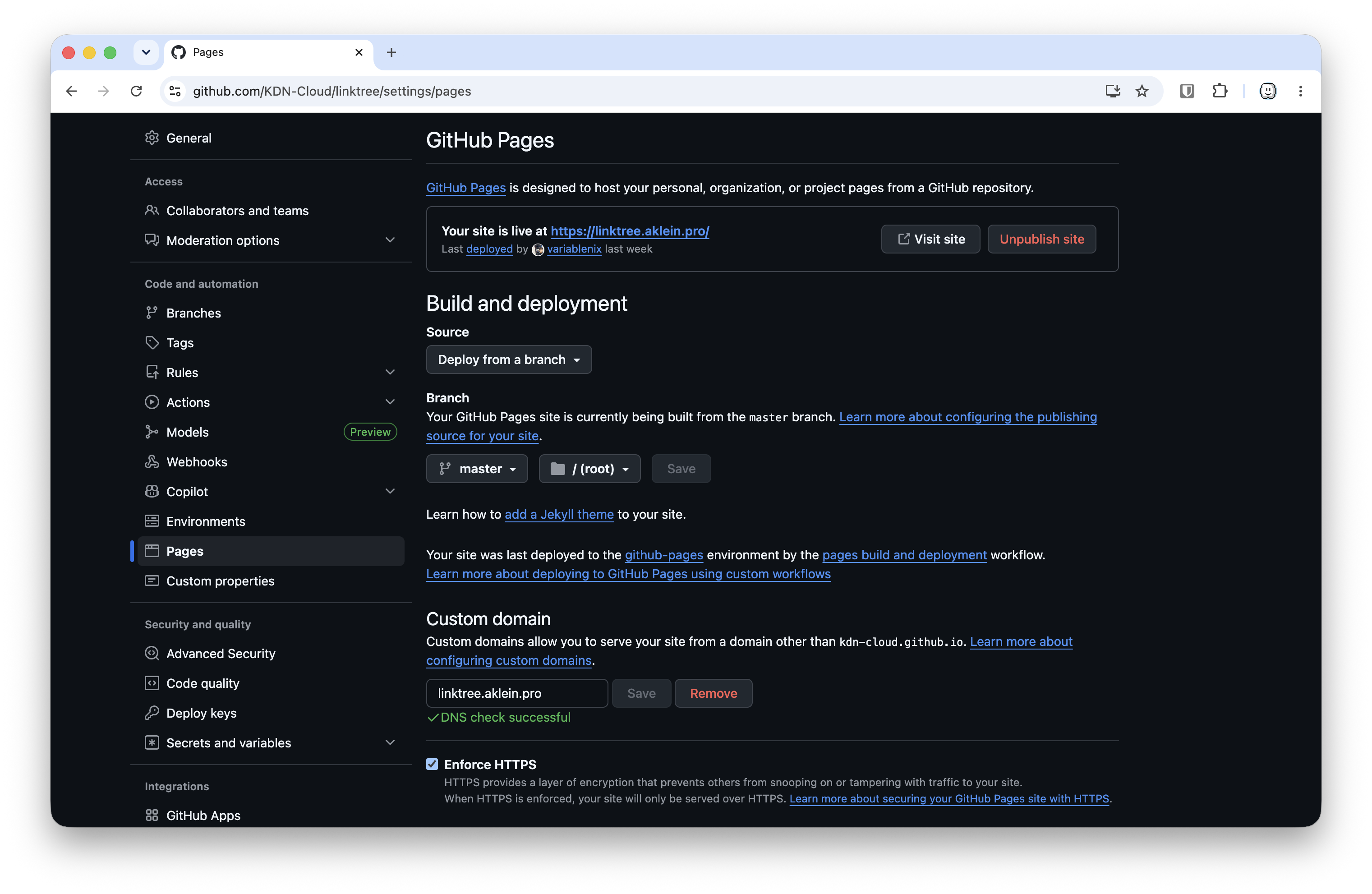
Personal vs. Organization repositories behave slightly differently. My linktree lives under the KDN-Cloud GitHub organization, not my personal account. For an org it works the same way. Enable it in repo Settings → Pages, set the source branch (master, root directory), and GitHub handles the rest.
The Pages settings screen is where you confirm your custom domain and verify DNS. You’ll see a green “DNS check successful” once everything is wired up correctly. Until then GitHub will show a warning, which is normal since DNS propagation takes a few minutes. Monitor worldwide propagation at DNSChecker.org.
Enforce HTTPS is a checkbox in the same screen. Check it. GitHub handles the TLS certificate automatically via Let’s Encrypt once your DNS is verified.
The CNAME File
This file does one job: tells GitHub Pages what custom domain to answer for. The entire content is just your domain name:
linktree.aklein.pro
No https://, no trailing slash. Push it and GitHub Pages picks it up automatically and pre-populates the custom domain field in the Pages settings UI.
If you change your domain later, update this file and push.
DNS Setup: The Custom Domain Gotcha
Any DNS provider works here — Cloudflare, Namecheap, Route 53, Porkbun, whatever you’re already using. The only requirement is that you can create a CNAME record (or A records for an apex domain) pointing to GitHub Pages.
For a subdomain like mine (linktree.aklein.pro), the generic setup looks like this:
Type:    CNAME
Name:    linktree
Target:  kdn-cloud.github.io
If you’re on Cloudflare, there’s one extra thing to know. Cloudflare adds a proxy setting to every DNS record — the orange cloud. Your instinct is probably to leave it on since it gives you DDoS protection, hides your origin IP, and adds caching. For GitHub Pages it creates a problem: GitHub verifies your domain by checking that DNS resolves to their servers, but the Cloudflare proxy intercepts that check and GitHub sees Cloudflare’s IP instead of its own, which breaks verification and can cause certificate provisioning to fail.
The fix is to set it to DNS only (gray cloud):
Type:    CNAME
Name:    linktree
Target:  kdn-cloud.github.io
Proxy:   DNS only (gray cloud — NOT orange)
You’re not giving up much here. GitHub Pages already sits behind a CDN with HTTPS enforced, so traffic is encrypted regardless.
The target in both cases is your GitHub Pages base hostname: <your-org-or-username>.github.io. Not the repo name, not the full site URL.
For an apex domain (yourdomain.com with no subdomain), use A records pointing to GitHub’s IPs instead of a CNAME. Those are documented in GitHub’s Pages docs and occasionally change, so verify there rather than copying from a blog post.
Customizing the Page
The profile image is a URL. I use my GitHub avatar at https://avatars.githubusercontent.com/u/YOUR_USER_ID because it’s always available, always current, and I don’t have to manage another asset.
Category labels aren’t part of the original template. I added them to group links into sections: “The Command Center” for professional and infrastructure links, “The Sound Booth” for music and creative stuff, “Active Uplinks” for communication channels. It’s a <div> with a class and some CSS. The generator handles this automatically via the category selector — create categories, assign links to them, and the Full block output includes the header.
SEO and meta tags are handled by the generator’s Page Setup tab. Fill in the fields, copy the output, paste it into the <head> of your index.html. The meta tag block covers primary description, canonical URL, Open Graph (title, description, image with dimensions, profile type, first/last name, username), and Twitter Card. The JSON-LD block generates a ProfilePage schema with a nested Person entity including job title, bio, sameAs profile URLs, worksFor organization, and address. Both outputs are independently copyable.
Google Analytics is included in the template via two script tags at the bottom of the <head>. I keep it because I genuinely want to know who’s landing on my links page — where they’re coming from, what they’re clicking, whether anyone is actually finding it. It’s a static HTML file with no backend, so GA4 is the only way to get that visibility. If you don’t want analytics, delete both script tags and the gtag.js file from the repo root. The page works fine without them.
The Alias Domain
My links page lives at linktree.aklein.pro as the canonical URL, but links.aklein.pro points to the same place. GitHub Pages serves one domain per repo, so the second one is a redirect rule at your DNS provider: links.aklein.pro/* to https://linktree.aklein.pro/$1 with a 301. Most DNS providers support this natively — Cloudflare calls it a Redirect Rule and it takes about thirty seconds to set up.
What This Costs
Nothing. GitHub Pages is free for public repositories. The only costs are whatever you already pay for your domain and DNS. If you’re on Cloudflare’s free tier, that’s zero.
Compare that to Linktree’s paid plans: Starter runs $8/month ($6 annually), Pro is $15/month ($12 annually), and Premium hits $35/month ($30 annually). SEO settings — the thing that makes your page actually discoverable — are locked behind Pro. That’s $12/month minimum just to control your own meta description on a page that’s essentially a list of links.
The End State
You end up with a links page that:
- Lives in a git repository you own and control
- Deploys automatically on every push
- Serves over HTTPS with a certificate GitHub manages for you
- Runs on your own domain with any DNS provider
- Has full SEO meta tags, Open Graph, Twitter Card, and JSON-LD schema
- Costs nothing to host
- Can be styled however you want across eight template options
- Has no platform dependency that can sunset, reprice, or change terms on you
The whole setup from fork to live site takes under an hour, most of which is waiting for DNS to propagate. The generator handles the parts that used to require hand-editing HTML: links, categories, SEO head tags, structured data, profile block, and a full page export when you’re ready to ship. You focus on the content.
Source code for my version is at github.com/KDN-Cloud/linktree. The live result is at links.aklein.pro. Fork it, break it, make it yours.
Comments
Questions, corrections, and follow-ups live in GitHub Discussions.