My wife needed a CRM for her business. She didn’t ask for anything elaborate — just something to keep track of clients, follow-ups, and contacts. I could have pointed her at HubSpot or any number of SaaS options and called it a day. But if you know me, you know that’s not how this goes.
She had just gotten her license and was standing up her business from scratch. When you’re in that position, every dollar matters. The problem with most modern CRM platforms is that they’re priced per seat — which sounds reasonable until you start doing the math. Add a few team members as the business grows and you’re looking at hundreds of dollars a month, thousands over a year, for software that holds your data hostage the moment you stop paying. For someone just getting started, that’s a hard pill to swallow before you’ve even landed your first clients.
Self-hosting flips that calculus entirely. The infrastructure costs a fraction of what SaaS charges, scales on our terms, and most importantly — the data is ours. Client contacts, communication history, business relationships — none of that sits inside a vendor’s application under someone else’s data policies or terms of service. We run on Vultr’s infrastructure, but we own and control everything above the hypervisor — the OS, the database, the backups, the encryption. No vendor kill switch, no surprise pricing changes, no wondering what the terms of service say about your data. That matters.
So instead of a per-seat SaaS subscription that scales against you, I spent a weekend building her something properly — a self-hosted Twenty CRM instance on a fresh VPS, provisioned with Terraform, configured with Ansible, secured with CrowdSec and Cloudflare, and wired into my existing homelab monitoring stack. This is the story of how Herald was born.
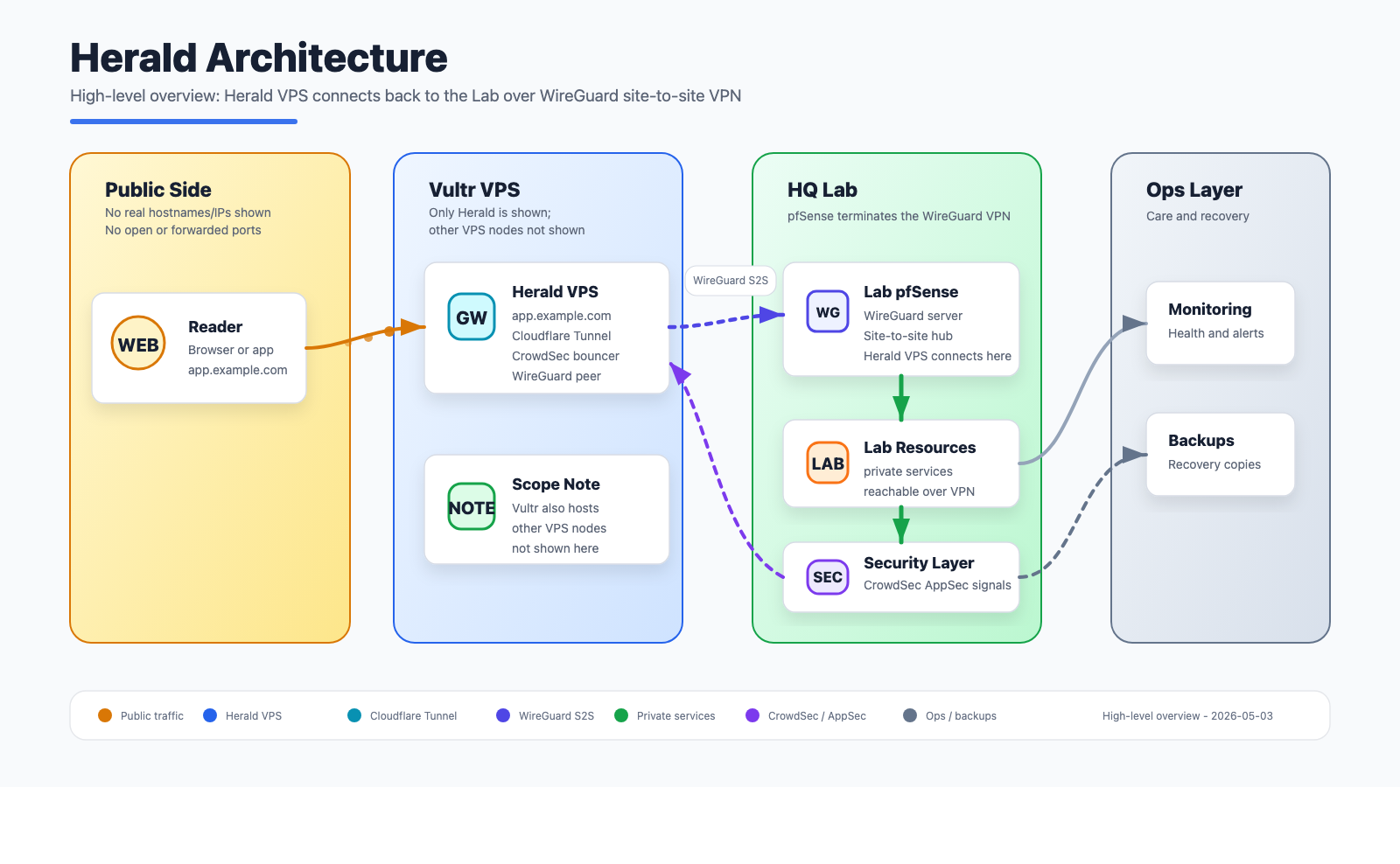 High-level architecture for Herald: public edge, secure tunnel, private services, monitoring, and backups.
Why Twenty CRM
Twenty is an open-source CRM built on NestJS and React, self-hostable via Docker Compose, and genuinely modern-looking. It supports Google OAuth, has a clean GraphQL API, and feels like a product someone actually put thought into rather than an afterthought. For a small business use case with one or two users it’s a great fit, and the fact that we own the data matters.
The deployment model is straightforward — a server container, a worker container, PostgreSQL, Redis, and a Cloudflare tunnel for ingress. No open ports needed on the host. That last part made it very appealing from a security standpoint.
Naming the Node
Every node in my homelab gets a name. This one became Herald — a messenger, a bringer of news. Felt right for something carrying my wife’s business communications.
Provisioning with Terraform
Rather than clicking through a provider dashboard, I used Terraform to spin up Herald on Vultr. The whole thing — instance, SSH key registration, firewall group — is defined in code and lives in my ops_automation repo. A terraform apply and the node exists. A terraform destroy and it’s gone cleanly.
The instance specs landed at 2 cores and 4GB of RAM, which turned out to be plenty for Twenty at low concurrent load. I’ll come back to that.
Terraform handles the infrastructure layer: the raw compute, networking rules, and initial SSH access. Everything after that is Ansible’s job.
Ansible: Automating Everything Else
Once Herald was up, I ran it through the same Ansible onboarding pipeline I use for every node in the lab. This is where the real work happens — not in clicking through configuration screens, but in roles that have been refined over time and apply consistently across the fleet.
Dotfiles and Base Configuration
The first thing that lands on any new node is the dotfiles role — shell aliases, vim config, tmux setup, the muscle memory stuff. It sounds trivial but it matters when you’re SSH’d into a box at midnight debugging something. Herald should feel like home immediately.
WireGuard Site-to-Site Tunnel
Herald lives on Vultr’s network, which means it’s geographically and topologically separate from my homelab. To bridge that gap I use WireGuard. pfSense on my Netgate 6100 acts as the WireGuard server and manages peer registration via the REST API. An Ansible playbook handles peer provisioning — it generates the keys, registers Herald as a peer on pfSense, and drops the WireGuard config on the node. After that Herald is on the same private network as everything else in the lab, reachable at its WireGuard IP without any public exposure.
This tunnel is what makes the rest of the stack possible. Prometheus can scrape Herald’s metrics. Graylog can receive its logs. CrowdSec’s agent can talk to GateKeeper LAPI. None of that crosses the public internet.
Monitoring: Prometheus, Grafana, Telegraf, and cAdvisor
Herald reports into the same monitoring stack as every other lab node. The Ansible monitoring role installs and configures:
- Telegraf — system metrics (CPU, memory, disk, network) forwarded to InfluxDB
- cAdvisor — Docker container metrics, scraped by Prometheus on moonlab
- Node Exporter — exposed only on the WireGuard interface, never publicly accessible
Grafana dashboards on the lab pick Herald up automatically once the scrape config is in place. One thing worth noting: cAdvisor has a habit of spiking CPU during its scrape cycle on a 2-core machine. It looks alarming in htop — one core suddenly pegged — but it’s periodic and brief. Normal behavior, not a cause for concern.
Uptime Kuma rounds out the monitoring picture — it watches Herald’s services from the outside, alerting if Twenty CRM becomes unreachable or the Cloudflare tunnel drops. Where Grafana tells you how the system is performing, Uptime Kuma tells you whether it’s actually up from an end-user perspective. Both questions matter when you’re running something for someone else’s business.
Log Forwarding to Graylog
Every node in the fleet forwards its auth and system logs to a centralized Graylog instance running on moonlab, backed by OpenSearch on NFS storage. The Ansible rsyslog role drops a config in /etc/rsyslog.d/ that forwards auth,authpriv.* and syslog traffic over TCP to Graylog’s GELF input.
One wrinkle: OpenSSH 9.8 changed the process name from sshd to sshd-session for authenticated sessions, which breaks older CrowdSec parsers. I’ve got a custom parser in the fleet that renames sshd-session back to sshd at the s00-raw stage, keeping detection working correctly on modern distros. That parser deploys via Ansible as part of the CrowdSec role.
You can confirm log forwarding is working with a quick test:
logger -p auth.info "test from herald"
If it shows up in Graylog within a few seconds, you’re wired up correctly.
Security: The Layered Approach
This is the part I probably spent the most time thinking through. Herald is a VPS running a web application for my wife’s business. It needs to be genuinely secure, not security-theater secure.
Cloudflare Tunnel
Twenty CRM is exposed to the internet exclusively via a Cloudflare tunnel. There are no open inbound ports on Herald — not 80, not 443, nothing. The cloudflared daemon runs as a container in the Compose stack and maintains an outbound-only connection to Cloudflare’s edge. Requests come in through Cloudflare and get forwarded to the Twenty server container internally.
This means Herald’s public IP is essentially irrelevant for web traffic. You can’t reach Twenty by hitting the IP directly. The origin is hidden.
CrowdSec Fleet Integration
Herald runs a CrowdSec agent that reports to GateKeeper, my central LAPI hub on the homelab at 192.168.70.84. GateKeeper aggregates detections from every node in the fleet — 14 agents at the time of writing — and pushes ban decisions back out to all bouncers.
On Herald specifically:
- The crowdsec-agent runs as a Docker container, reading
/var/log/auth.log,/var/log/syslog, and Docker container logs via label-based discovery - The crowdsec-firewall-bouncer runs as a systemd service, maintaining iptables rules based on decisions from GateKeeper
- A custom
trusted-ips-whitelistparser ensures my homelab’s WireGuard ranges are never accidentally banned
The moment Herald was registered with GateKeeper, it inherited the fleet’s full decision set — over 32,000 IPs actively blocked at the iptables level, sourced from the CrowdSec community blocklist, firehol_greensnow, OTX web scanners, and Tor exit nodes. A brand new node with zero history immediately benefits from the collective intelligence of the entire CrowdSec network. That’s the part I find genuinely elegant about this architecture.
The Cloudflare Bouncer on Nexus
Running alongside everything is a CrowdSec Cloudflare bouncer on Nexus, my other VPS. This bouncer pushes ban decisions from GateKeeper directly into Cloudflare’s firewall via the API, meaning known bad IPs get blocked at the Cloudflare edge — before they even reach the tunnel. The community blocklist, Tor exit nodes, and any locally detected attackers all flow through this path automatically.
It’s a clean separation: GateKeeper decides, the Cloudflare bouncer enforces at the edge, the iptables bouncer enforces at the host. Detect here, remediate everywhere.
The Twenty CRM Stack
The Compose file for Twenty is fairly standard — server, worker, PostgreSQL 16, Redis, and cloudflared. A few things worth noting from the deployment:
Google OAuth is enabled for authentication, which means my wife logs in with her Google account rather than managing a separate password. One less credential to worry about.
CrowdSec Docker label discovery is configured on the Twenty containers so the agent monitors their logs automatically:
labels:
  crowdsec.enable: "true"
  crowdsec.labels.type: "http"
One honest limitation: Twenty’s default Docker deployment produces no HTTP access logs. The server outputs NestJS framework logs — route mapping, startup events, i18n warnings — but no structured access log with IP addresses, methods, and status codes. This means CrowdSec can’t do HTTP-level detection from Twenty’s logs alone. The Cloudflare bot protection and the host-level SSH/system detection cover the gaps, but it’s worth knowing if you’re planning a similar setup.
Rate limiting is configured directly in the Compose environment rather than via Twenty’s Admin Panel. Twenty exposes rate limiting config through a database-backed Admin Panel UI, but hardcoding the values in docker-compose.yml is more reliable — it guarantees the values survive redeployments and aren’t silently overridden:
environment:
  API_RATE_LIMITING_LONG_LIMIT: "5000"
  API_RATE_LIMITING_LONG_TTL: "60000"
  API_RATE_LIMITING_SHORT_LIMIT: "5000"
  API_RATE_LIMITING_SHORT_TTL: "1000"
The defaults (100 requests per 60 seconds) are too conservative for normal CRM usage — loading a People or Companies view fires multiple concurrent GraphQL requests, and a busy page load can easily exceed the default ceiling. Bumping these to 5000 gives plenty of headroom for legitimate usage while keeping the limiter in place as a backstop.
Debugging a Twenty Performance Issue
During initial testing I noticed Twenty was slow to start — like, concerningly slow. Multiple restarts, health check failures, the server container cycling before stabilizing. I dug into it and found the culprit was a Node.js memory constraint issue combined with the 4GB VPS spec.
Twenty’s server process was hitting memory pressure during startup due to the default Node.js heap limit being too conservative for the amount of initialization work it does. The fix is straightforward — set NODE_OPTIONS in the Compose environment:
environment:
  NODE_OPTIONS: "--max-old-space-size=1536"
This gives the Node.js heap more room to breathe during startup without pushing the total container memory footprint into territory that would starve the other containers. After this change Twenty starts cleanly and stays stable. I filed a note upstream about this behavior on a 2-core/4GB instance — it’s a reasonable default deployment spec and the startup behavior without the flag is surprising enough that it’s worth documenting.
The Daily Digest
One final piece I added after everything was running: a daily Telegram digest that posts to GateKeeper222_bot every morning. It’s a simple bash script on GateKeeper that queries cscli and reports:
- How many agents and bouncers are online
- Whether Herald and Nexus are heartbeating
- Local detections in the past 24 hours
- Total active decisions by origin (CAPI, blocklists, local)
- Breakdown by category (SSH brute force, HTTP scan, Tor exit nodes, etc.)
It runs via cron at 8am and gives me a one-glance health check without having to SSH into anything. Most mornings it’ll show zero local detections — which means the preemptive blocklists are doing their job and nothing novel has gotten through. The day the local detection count is nonzero is the day something interesting happened.
What Herald Looks Like Now
After everything is said and done, Herald is:
- A 2-core, 4GB Vultr VPS provisioned with Terraform
- Configured end-to-end with Ansible — base system, dotfiles, WireGuard, monitoring, log forwarding, CrowdSec
- Running Twenty CRM via Docker Compose with Google OAuth
- Exposed exclusively via Cloudflare tunnel — no open inbound ports
- Protected by CrowdSec’s community blocklist (32,000+ IPs blocked at iptables)
- Integrated into the homelab monitoring stack — Prometheus, Grafana, Graylog
- Reporting daily to Telegram
Backups
One thing I didn’t want to skip on: backups. Vultr offers automated VPS snapshots for $4 a month — an almost embarrassingly good deal when you consider what’s running on the machine. My wife’s client contacts, business relationships, and communication history are worth more than $4. We have automated snapshots enabled at the Vultr level, which handles the infrastructure layer. On top of that, PostgreSQL’s data volume is a named Docker volume that gets captured in the snapshot, so the database comes along for the ride without any extra configuration.
For a brand new business where every client relationship matters, having that safety net in place before anything else goes live wasn’t optional. It took thirty seconds to enable in the Vultr dashboard and it’s one of those things you only think about when you need it — and you really don’t want to need it without it.
My wife has a CRM for her business. It’s fast, it’s private, the data is ours, and it’s secured the same way I’d secure anything else I care about. That felt worth doing right.
All infrastructure code lives in my private ops_automation Ansible repo and a Terraform module in the KDN Lab Gitea instance. If you’re building something similar and want to talk through the architecture, let’s connect.
Comments
Questions, corrections, and follow-ups live in GitHub Discussions.