The old coygeek post that everyone referenced for this is long gone. Since I run pfBlockerNG on my Netgate 6100 and have a Block_Tik_Tok DNSBL group already in production, figured it was time to write this up properly, including the parts the original post skipped, like IP and ASN blocking.
Why bother blocking it at the firewall?
App-level blocking is a joke. Browser extensions don’t help on mobile. If you want TikTok off your network, whether for your kids, a corporate policy, or because you’d prefer ByteDance not hoover up everything on your LAN, you need to do it at the DNS and IP layer. This post covers both.
Prerequisites
- pfSense (Plus or CE) with pfBlockerNG-devel installed
- Unbound configured as your DNS resolver (pfBlockerNG DNSBL hooks into Unbound)
- pfBlockerNG enabled and the DNSBL feature turned on
Part 1: DNSBL / Block TikTok Domains
Create a new DNSBL Group
Navigate to:
Firewall → pfBlockerNG → DNSBL → DNSBL Groups → + Add
Or directly: https://pfsense.lan/pfblockerng/pfblockerng_category.php?type=dnsbl
Group settings:
| Field | Value |
|---|---|
| Name | Block_Tik_Tok |
| Description | Block TikTok and ByteDance infrastructure |
| Action | Unbound |
| Update Frequency | Once a day |
| Logging/Blocking Mode | DNSBL WebServer/VIP |
Option A: Use an auto-updating feed (recommended)
The best maintained TikTok domain blocklist right now is from M4jx on GitHub. It’s derived from live mobile traffic captures, not just guesswork, and is formatted for pfBlockerNG DNSBL.
Under DNSBL Source Definitions, add:
| Field | Value |
|---|---|
| Format | Auto |
| State | ON |
| Source | https://raw.githubusercontent.com/M4jx/TikTokBlockList/main/hosts |
| Header/Label | TikTok |
This keeps your block list current without having to manually chase down new ByteDance domains every time TikTok rotates infrastructure.
Option B: Manual DNSBL Custom_List
If you’d rather maintain a static list (or supplement the feed), paste the following into the DNSBL Custom_List section at the bottom of the group edit page:
abtest-va-tiktok.byteoversea.com
isnssdk.com
lf1-ttcdn-tos.pstatp.com
muscdn.com
musemuse.cn
musical.ly
p1-tt-ipv6.byteimg.com
p1-tt.byteimg.com
p16-ad-sg.ibyteimg.com
p16-tiktok-sg.ibyteimg.com
p16-tiktok-sign-va-h2.ibyteimg.com
p16-tiktok-va-h2.ibyteimg.com
p16-tiktok-va.ibyteimg.com
p16-va-tiktok.ibyteimg.com
p26-tt.byteimg.com
p3-tt-ipv6.byteimg.com
p9-tt.byteimg.com
sf1-ttcdn-tos.pstatp.com
sf16-ttcdn-tos.ipstatp.com
sf6-ttcdn-tos.pstatp.com
sgsnssdk.com
tiktok.com
tiktokcdn-in.com
tiktokcdn.com
tiktokcdn.com.c.bytetcdn.com
tiktokcdn.com.c.worldfcdn.com
tiktokcdn.com.wsdvs.com
tiktokcdn.liveplay.myqcloud.com
tiktokv.com
ttlivecdn.com
ttlivecdn.com.c.worldfcdn.com
ttlivecdn.com.wsdvs.com
ttoversea.net
Note: pfBlockerNG DNSBL does not support regex or wildcard entries in the Custom_List. One domain per line, no patterns.
Part 2: IP Blocking (Because DNS Isn’t Enough)
DNS blocking alone can be bypassed. The TikTok app (especially on mobile) can use DoH or DoT to resolve domains through Cloudflare or Google, completely bypassing your local resolver. You need IP-level blocking to close that gap.
IPv4
Navigate to Firewall → pfBlockerNG → IP → IPv4 → + Add
| Field | Value |
|---|---|
| Name | TikTok_IPv4 |
| Description | TikTok IPv4 ranges |
| State | ON |
| Source | https://raw.githubusercontent.com/M4jx/TikTokBlockList/main/ipv4s |
| Header/Label | TikTok |
| Action | Deny Both |
| Update Frequency | Once a day |
IPv6
Navigate to Firewall → pfBlockerNG → IP → IPv6 → + Add with the same settings, different source:
https://raw.githubusercontent.com/M4jx/TikTokBlockList/main/ipv6s
Part 3: Block DoH (DNS over HTTPS)
This is the one most guides skip. If you block domains at the DNS level but leave DoH wide open, anything using a hardcoded DoH resolver (Firefox does this by default, TikTok’s CDN can too) will just route around you.
Block known DoH providers via DNSBL. I have a dedicated DoH group for this. pfBlockerNG ships with a DoH feed, or you can reference the Netgate forum thread that covers it:
https://forum.netgate.com/topic/154408/firefox-users-and-doh/
You’ll also want a firewall rule blocking outbound TCP/UDP 853 (DoT) to anything that isn’t your own resolver, and consider blocking port 443 to known DoH IPs if you want to go further.
Part 3.5: Decide Whether This Applies to the Whole Network or Just One Segment
This is the part people usually skip until someone in the house asks why everything got weird.
If you apply these blocks globally, every device using your pfSense resolver and traversing your firewall gets the same treatment. That might be exactly what you want. It might also be overkill.
If your network is already segmented, and it probably should be, this gets a lot cleaner. Apply stricter blocking to a kids VLAN, guest VLAN, or school-device segment first. Leave your admin or lab VLAN alone until you’ve confirmed the lists are not causing collateral damage. TikTok’s CDN footprint can overlap with services you do not immediately associate with TikTok, especially once you start blocking aggressively at the IP and ASN layers.
The practical way to think about it:
- DNSBL usually makes sense network-wide.
- IP and ASN blocking are where you should be more deliberate if you run segmented networks.
- DoH and DoT blocking should be tested per segment before you call it done.
If you are running separate firewall rules per VLAN, make sure the deny logic actually applies to the interfaces you care about. A perfect block list attached to the wrong place is still a no-op.
Part 4: Force Update + Verify
After saving everything:
Firewall → pfBlockerNG → Update → Run (Force) → All
Then from a client on your LAN:
nslookup tiktok.com
You should get back the DNSBL VIP (something like 10.10.10.1 or whatever your DNSBL WebServer/VIP is configured to) instead of a real IP.
Navigating to tiktok.com in a browser should hit the pfBlockerNG block page. On mobile, the TikTok app will open but videos won’t load.
Quick verification checklist
If you want to be sure the block is actually doing what you think it is doing, this is the shortest useful test path:
- Force update pfBlockerNG.
- Clear active states for any device that already had TikTok open.
- Confirm
nslookup tiktok.comreturns the DNSBL VIP, not a public IP. - Try opening
tiktok.comin a browser on Wi-Fi. - Open the TikTok app on Wi-Fi and verify the feed does not load.
- Check pfBlockerNG logs to confirm domains or IPs are actually being matched.
That last one matters. Do not stop at “the app looks broken.” Make sure pfSense is the reason it is broken.
Part 5: ASN Blocking
DNS blocking catches domains. IP blocking catches addresses. ASN blocking catches entire network ranges assigned to ByteDance regardless of what domains or IPs they spin up next. It’s the most durable layer of the three and the one most guides skip entirely.
The M4jx repo includes an ASN feed alongside the domain and IP lists. TikTok’s primary ASN is AS138699 and ByteDance operates several others. Add this in pfBlockerNG under the IP section the same way you added the IPv4 and IPv6 feeds:
Navigate to Firewall → pfBlockerNG → IP → IPv4 → + Add
| Field | Value |
|---|---|
| Name | TikTok_ASN |
| Description | TikTok and ByteDance ASN ranges |
| State | ON |
| Source | https://raw.githubusercontent.com/M4jx/TikTokBlockList/main/asns |
| Header/Label | TikTok_ASN |
| Action | Deny Both |
| Update Frequency | Once a day |
The reason ASN blocking matters in the long run: ByteDance regularly rotates specific domains and IP addresses, which is why the M4jx list exists and why it’s pulled from live traffic captures rather than a static snapshot. But the autonomous system numbers change far less frequently. Blocking at the ASN level means new IPs ByteDance brings up within those ranges get blocked automatically without waiting for the domain or IP lists to update.
A note on Unbound
pfBlockerNG DNSBL only works if pfSense is using Unbound as its DNS resolver. This catches people who have the DNS Forwarder enabled instead. Go to Services, DNS Resolver, and confirm it is enabled and running. While you’re there, check that pfBlockerNG is configured to hook into Unbound under the pfBlockerNG DNSBL settings. If DNSBL is enabled but Unbound is not the active resolver, domain blocking will silently do nothing and you’ll wonder why TikTok still loads.
Kill States After Updating
After you force-update pfBlockerNG rules, existing network connections that were established before the new blocks went into effect are not automatically terminated. A phone that was already talking to TikTok’s servers will stay connected until the session drops on its own, which could be a while.
To close those connections immediately, go to Diagnostics, States, and clear or filter states for TikTok IP ranges. You can filter by destination IP to find active TikTok connections and reset them specifically rather than flushing everything. This is worth doing right after a force update if you want the blocking to take effect immediately rather than waiting for sessions to expire naturally.
If you are testing from one phone and want to keep it surgical, clear states just for that client IP. That is usually faster and a lot less annoying than punting every active state on the firewall because one app refuses to let go.
If TikTok Still Works, Check These First
If the app is still loading normally after all of this, the failure is usually one of a handful of boring things:
- The phone is on cellular, not Wi-Fi.
- Unbound is not the active resolver.
- The device is using a hardcoded external DNS server.
- DoH or DoT is still open.
- Existing states were never cleared.
- The pfBlockerNG feeds updated, but the matching rule did not land where you expected.
The fastest troubleshooting flow is:
- Confirm the client is actually on your Wi-Fi.
- Run
nslookup tiktok.comfrom that same network. - Check pfBlockerNG DNSBL reports for
tiktok.com,tiktokv.com, or ByteDance-related hits. - Check firewall logs for blocked destination IPs from the client.
- Temporarily disable cellular and any VPN client on the phone while testing.
If none of that shows hits, you are not blocking the traffic path the device is actually using.
Honest Limitations Worth Knowing
A few things this setup does not cover that are worth being upfront about.
If a device is on cellular data rather than your Wi-Fi, none of this applies. The phone bypasses your network entirely and pfBlockerNG has no visibility into it. This matters a lot if the goal is parental control, because a phone that leaves the house or switches to mobile data is outside your reach.
A VPN app on the device routes around everything here. If someone installs a VPN client on their phone and connects to an external server, their TikTok traffic leaves your network encrypted and exits somewhere else entirely. pfBlockerNG can block known commercial VPN provider IP ranges if you want to address this, but it’s an arms race and determined users will find workarounds. The honest answer is that network-level blocking works well for passive enforcement and convenience but is not a substitute for device-level controls when the goal is strict restriction.
Neither of these are reasons not to do this. DNSBL plus IP blocking plus ASN blocking covers the vast majority of cases and handles the unintentional TikTok usage scenario completely. Just worth knowing where the edges are.
A note on domain list staleness
TikTok’s infrastructure is not static. ByteDance rotates domains and CDN endpoints regularly. A static custom list will drift over time. I’ve seen the byteimg.com and ibyteimg.com subdomains change on me. The M4jx repo is updated from live traffic captures and is currently the best maintained source I’ve found for this. Pair it with the IP blocklists and you’ve got solid coverage without having to babysit it.
For reference on what TikTok’s full network footprint looks like, netify.ai’s TikTok page has good detail on domains, IPs, and ASNs.
Final Advice
If you only do one thing here, use the maintained M4jx feeds and let them update automatically. If you do two things, add IP blocking on top of DNSBL. If you do the whole job properly, include DoH, DoT, ASN blocking, and a state reset after rollout.
That is the difference between “TikTok seems flaky on my network” and “TikTok is actually blocked.”
Result
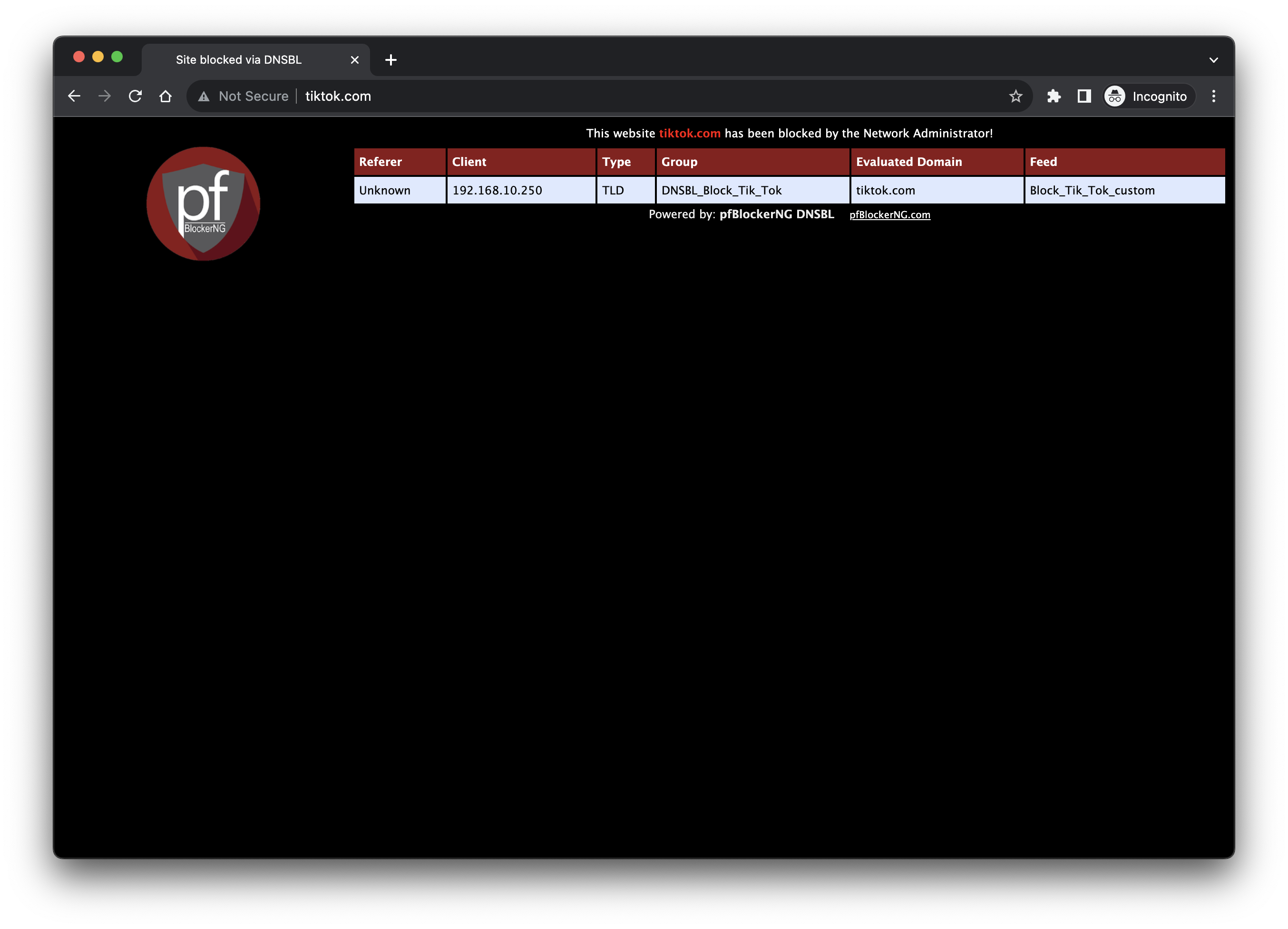
DNS blocked at the firewall, IP ranges dropped, ASN ranges covered, DoH neutered. That’s a dead app.
Comments
Questions, corrections, and follow-ups live in GitHub Discussions.